Osmolog Add to your browser

You pick up a language—almost by osmosis.

See how much language
immersion you actually do.

Osmolog automatically tracks active and passive immersion while you watch or listen. No stopwatch and no language switching.

  • Starts and stops itself
  • Active and passive kept apart
  • 3 languages in one evening? You never change a setting.

Works on YouTube, Netflix, Twitch and Crunchyroll. Free. No account required. Local by default. No ads.

Osmolog · OverviewViewing: Japanese
Total tracked 54h 00m +18% vs previous 30 days
Daily average 1h 48m across 30 calendar days
Days immersed 24/30 2h 15m per immersed day
Average session 24m across 135 sessions

Immersion over time

Active and passive minutes, last 30 days

Click a line or a label to isolate it.

How you immerse

  • Watching33h 30m
  • Listening12h 50m
  • Reading5h 20m
  • Vocabulary2h 20m

Your attention mix

Active
37h 48m70%
Passive
16h 12m30%

Where it came from

  • YouTube20h 40m
  • Netflix13h 20m
  • Twitch9h 20m
  • Manual7h 40m
  • YouTube Music3h 00m

Built by a language learner and gamer. Number go up, brain happy. That's where it started.

Why it exists

I know myself too well to press start.

I watch in Japanese, English and Swedish, sometimes in the same evening. Every tracker I tried wanted me to choose a language and start a stopwatch first. I know myself too well. I was never going to keep that up.

So I built the tracker I wanted: it starts and stops itself, works out which language is playing, and separates the time I am watching from the time something is merely playing while I cook. Then it shows me where those hours actually went.

It was only meant to be for me. It grew into a polished one-person project, so I decided to share it for free.

— Melis

How it works
  1. You start a video.

    YouTube, Netflix, Twitch or Crunchyroll. Just press play. Osmolog is already running in the background.

  2. It works out the language.

    From the audio track, the captions and the player data. If it can't tell, it asks you instead of guessing, and remembers your answer for that channel or series, so it's not asking again every time you open your favourite creator.

  3. You come back to proof.

    The time lands under the right language, source and activity, split into active and passive. Nothing to sort or move yourself.

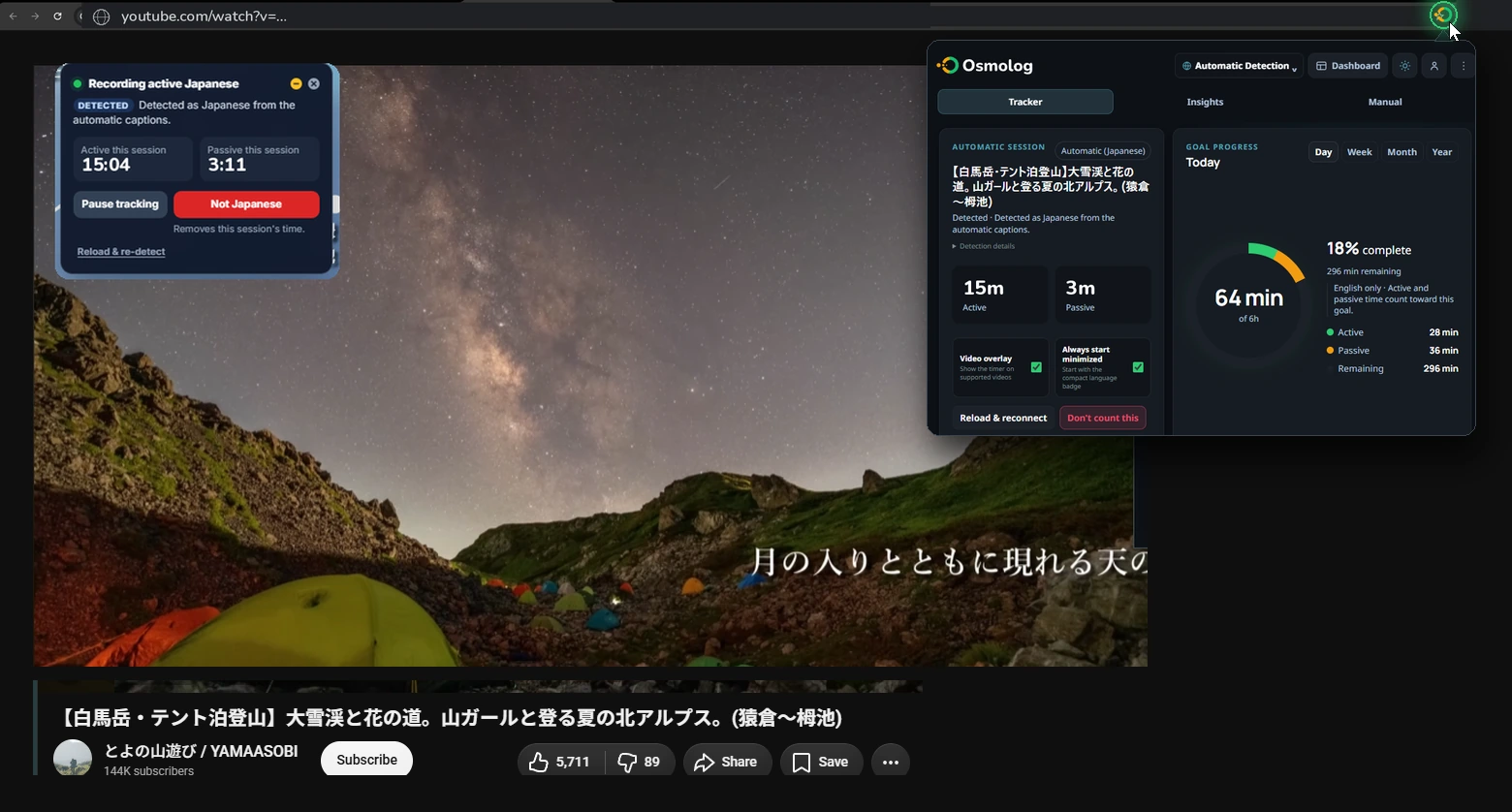
A Japanese YouTube video playing with the Osmolog badge counting 15:04 active and 3:11 passive, and the Osmolog toolbar popup open showing the detected session and today's goal
Click the toolbar icon for the session and today's progress. The badge on the video shows what is being counted right now: pause it, correct it, or dismiss it.
FAQ

Questions people usually have.

What it tracks, and how

Where it works

YouTube, Netflix, Twitch and Crunchyroll, on both live streams and VODs where available. Playback starts the timer; muting or pausing stops it. Twitch is here because it's where I actually watch: Japanese streamers playing games I already play is the easiest immersion I've found. Anything else stays labelled Beta or Experimental in the extension until I've checked it against that site's current player, because there's no point counting time I can't count correctly.

Every language, no switching

It reads the language off each session and files the time under it. Japanese, then something in English, then Swedish, in one evening. All three are recorded and kept apart, and you're never asked to set a language first. The dashboard shows one language at a time today; a side-by-side view of how your time splits between them is the next thing I'm building.

Active and passive

Focused foreground viewing counts as active. Audible playback that keeps running while you cook or walk counts as passive. Both are kept, both are shown, and they're never added together into one flattering number. Active is always green, passive is always amber, everywhere in the product.

When, not just how much my favourite bit

Time of day, day of week, session length, streaks, a year heatmap and a weekly recap. This is the part I actually use: whether my evenings are focused or just background noise, and which day of the week quietly does the work.

YouTube Music, honestly undecided

Music plays through a video element, so the extension can see it and does count it: active if the tab is in front, passive if it's behind. I've deliberately not folded it in with everything else. Eight hours of background music is not eight hours of immersion, and a number that says otherwise is worse than no number. So it sits in its own source category where you can see it, judge it, and turn it off if you'd rather it didn't count. If you have a strong view on how this should work, tell me. I'm genuinely undecided.

Everything that's not video

A persistent timer and backdated entries cover reading, tutoring and speaking practice. Manual time counts towards your own totals, but it's excluded from any shared leaderboard, so nobody can pad a number.

Where your data lives

Local by default

Without Pro full backup, detailed history stays in your browser. Local tracking needs no account, and Osmolog never sends URLs, subtitles, searches or page text to its own services.

If you enable Pro full backup

After you review the disclosure and sign in, Osmolog can store your complete tracker history and settings in your private account backup for recovery. That includes session titles and timing, but excludes URLs, searches, subtitles, page text and artwork URLs.

Usage analytics, if you want to help

There's a switch in Settings → Privacy & data marked Send anonymous usage data. It's off until you turn it on. With it on, the extension sends the target language, the general platform, active and passive duration, broad content type, the date and the extension version. It never sends titles, URLs, search terms, subtitles or your manual notes. It's the only way I can see which features people actually use and which are quietly broken. If that default ever changes you'll be told first, not afterwards.

This website

osmolog.com counts page views through Cloudflare Web Analytics: which page, roughly which country, and where the visit came from. No cookies, no following you around the web. It's completely separate from the extension and can't see anything inside it. It exists so I can tell whether anyone found the site at all.

No advertising, nothing sold

No advertising SDK, no data broker, no sale. There's nobody to sell it to and I'm not going to build that.

Getting it out again

JSON backup and CSV export of your aggregates, any time, without asking me.

What's coming, and honest answers

Comparing with a friend preview

An optional way to compare momentum with a friend or a small group. Members would see each other's totals and nothing else: never titles, never URLs, never what anyone watched. It's still being built.

Seeing your languages side by side next

Everything is already recorded per language. What's missing is the view that puts them next to each other: how your week splits between Japanese, English and Swedish, and whether one is quietly eating the others. That's the next thing I'm building.

More platforms

Each site needs its own player handling and each one breaks when that site changes. I'd rather support three well than twelve badly, so they arrive one at a time.

Will it stay free?

Local tracking is free and it stays that way. I'm not going to charge you for tracking, for looking at your own stats, or for exporting your own backups. Cloud sync and the group features cost me money to run, so those will eventually be paid. There's no trial quietly running out in the background; when that changes, I'll say so clearly first.

Does it work if I don't watch video?

Partly. The automatic side needs playback. For reading, tutoring or speaking you use the manual timer, which is a worse experience and I'm not going to claim otherwise.

I'm learning two languages. Do I need two of anything?

No. One install, one dashboard, and every language is recorded separately from the moment you start. You don't configure it and you don't switch it.

Track yours.

Install it, forget it, check back in a month.

Add Osmolog to your browser Free. No account. No ads.